For several months, my WordPress site, budgettechindia.com, was serving an incorrect robots.txt file to search engine crawlers. The file was missing crucial Sitemap directives, despite my SEO plugin, All in One SEO (AIOSEO), showing the correct configuration in its editor. This discrepancy meant that while I believed the site was correctly guiding crawlers, it was actually hindering its own discoverability.
What was wrong
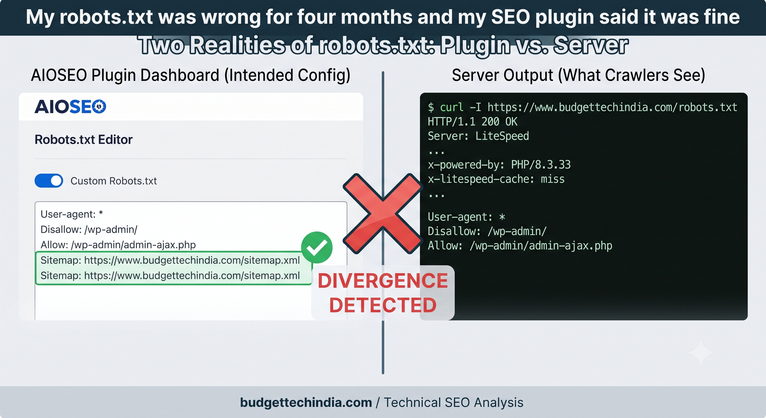
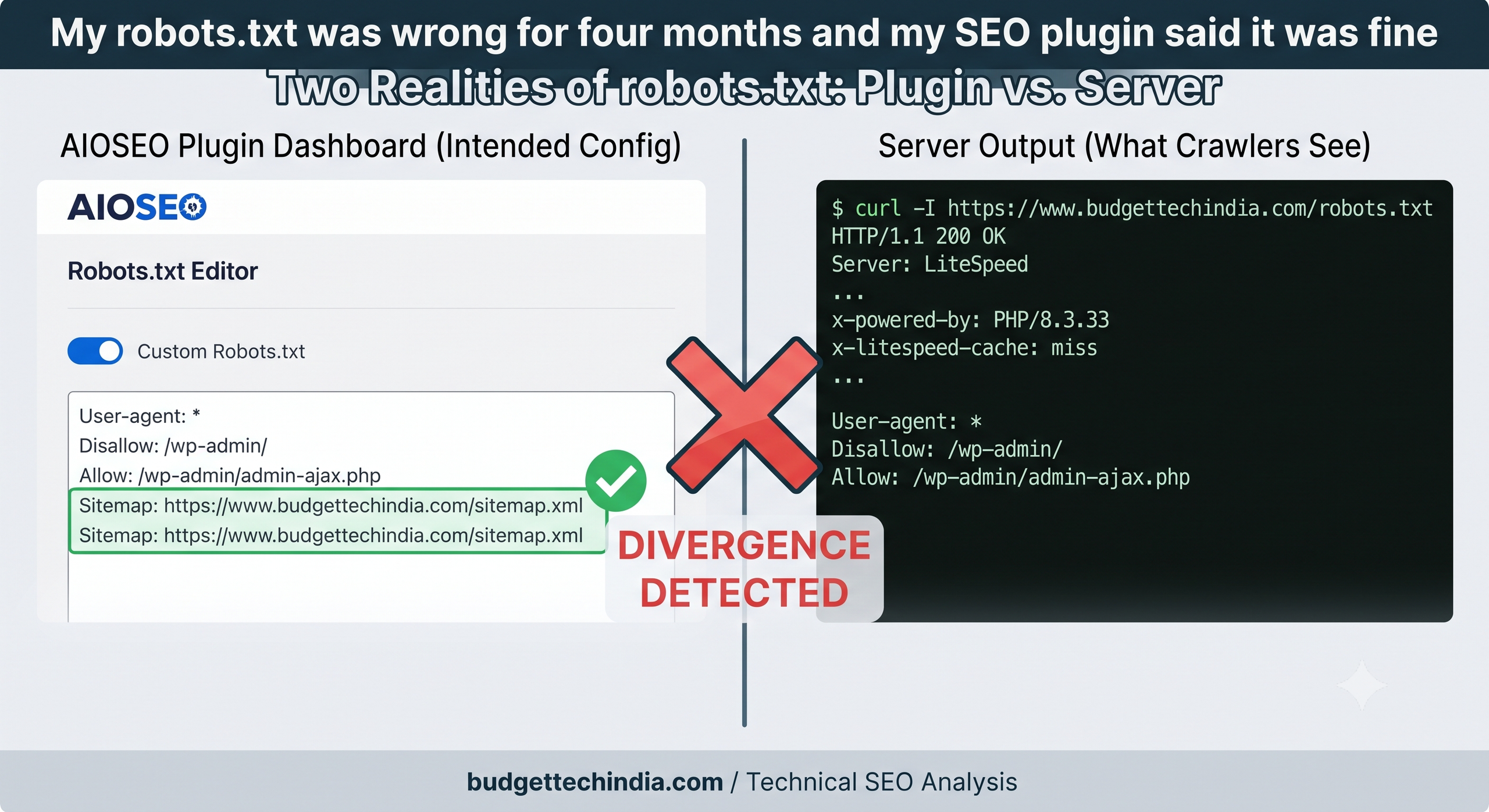
The Robots.txt Editor within All in One SEO displayed a custom robots.txt configuration that included the sitemap directive:
User-agent: *
Disallow: /wp-admin/
Allow: /wp-admin/admin-ajax.php

Sitemap: https://www.budgettechindia.com/sitemap.xml
Sitemap: https://www.budgettechindia.com/sitemap.xml
Notice the Sitemap directive listed twice—a minor oversight, but one that didn’t affect the core problem. The critical issue was that the file actually served to crawlers was significantly different. It was only 69 bytes and contained no sitemap line at all:
User-agent: *
Disallow: /wp-admin/
Allow: /wp-admin/admin-ajax.php
The AIOSEO plugin’s internal preview reads directly from the database, reflecting what I intended the robots.txt to be. However, the public file served to the web was generated separately. These two sources of truth had diverged for months, and nothing in my workflow or the plugin’s interface surfaced this critical gap.
How long this went unnoticed
I first became aware of a potential issue about three or four months prior to discovering the root cause. I was reviewing Google Search Console, investigating an unrelated indexing problem, when the site’s robots.txt configuration came to my attention.
At that time, I went into the AIOSEO plugin, made sure the Sitemap directive was present in the editor, and observed that the preview showed the correct content. Satisfied, I assumed the job was done. This assumption was my entire mistake. The preview was indeed correct, but the file served publicly was not. Because the screen I was looking at indicated everything was fine, I had no reason to investigate further, and the problem persisted for another four months while I focused on other priorities.
Ruling out the obvious causes
When I finally revisited the issue, I systematically ruled out the most common culprits for configuration discrepancies.
Not a caching issue
My site runs LiteSpeed Cache, which is often the first suspect for outdated content. To bypass any cached output, I appended a unique query string to the robots.txt URL:
/robots.txt?nocache=1790084123332The response I received carried the x-litespeed-cache: miss header, confirming that the file was freshly generated by PHP, not served from cache. Crucially, this uncached response was byte-identical to the problematic version: 69 bytes, still no sitemap line. This single request was enough to rule out caching as the cause.
Not a stale physical file
Next, I checked if a static robots.txt file might be overriding WordPress. The response headers provided immediate clues:
x-powered-by: PHP/8.3.33Link: <.../wp-json/>; rel="https://api.w.org/"
Both of these headers are added by WordPress when it processes a request. Their presence confirmed that PHP was actively generating the robots.txt file. A static file served directly by the web server would not include these WordPress-specific headers. I later confirmed this by checking the host’s file manager; there was no robots.txt file present in the public_html directory.
My conclusion was clear: the AIOSEO plugin was indeed generating the robots.txt content via PHP, but it was simply failing to include the Sitemap directive in the actual output, despite displaying it correctly within its own preview interface.
Potential plugin conflict
The site also runs other plugins that can interact with robots.txt generation, specifically Site Kit and Wordfence, both of which are known to hook into WordPress’s robots_txt filter. While it’s possible one of these was conflicting with AIOSEO’s output, I did not chase this specific conflict further. My priority was to implement a robust and permanent solution rather than debugging an intermittent plugin interaction.
The fix: A physical robots.txt file
The most robust solution to prevent any plugin or WordPress filter from inadvertently altering the robots.txt content is to bypass WordPress entirely. This is achieved by creating a physical robots.txt file directly in the site’s root directory (public_html/robots.txt).
I created the file with the following content, ensuring the Sitemap directive was correctly present (and only once):
User-agent: *
Disallow: /wp-admin/
Allow: /wp-admin/admin-ajax.php

Sitemap: https://www.budgettechindia.com/sitemap.xml
A physical file located at the root of the domain is served by the web server (e.g., LiteSpeed, Apache, Nginx) before WordPress is even loaded. This means no plugin, theme, or WordPress core filter can override or modify its content. It’s the definitive source of truth for crawlers.
Confirming the fix from outside
After creating the physical file, I re-ran the same type of request I had used for debugging, fetching the robots.txt from the live site. This time, the response confirmed the fix:
- The file size was 124 bytes (up from 69).
- It included a
Last-Modifiedheader (e.g.,Tue, 22 Sep 2026 13:40:51 GMT), indicating it was a static file. - Crucially, there was no
x-powered-byheader. - There was also no
x-litespeed-cacheheader.
The absence of the x-powered-by header (which indicates PHP processing) and the x-litespeed-cache header (which indicates application-level caching) was the definitive proof. It meant the web server was serving the static file directly, completely bypassing WordPress and its plugins. The contents of the file were now exactly as I intended, including the vital Sitemap directive.
The lesson learned
This experience reinforced a fundamental principle: a plugin’s internal preview shows what it intends to output, but a crawler receives what the web server actually sends. These are two distinct things, and only the latter truly matters for SEO and site functionality.
The check itself is incredibly simple and takes mere seconds: open the real URL in a private browser window, or run a quick curl -I https://www.budgettechindia.com/robots.txt from the command line. I neglected this basic verification, and that oversight ultimately cost me four months of suboptimal crawler guidance.
Reusable debugging technique: Bypassing LiteSpeed Cache
One valuable technique I used during this investigation, applicable to any LiteSpeed-powered WordPress site, is the cache bypass method:
- Append
?nocache=<timestamp>to any URL you wish to test. The timestamp ensures the query string is unique every time, preventing browser or proxy caching. For example:https://www.yourdomain.com/some-page/?nocache=1790084123332 - Check the
x-litespeed-cacheresponse header.
If the header value is miss, you are looking at the content freshly generated by your application (WordPress/PHP) right now. If it’s hit, you are seeing a cached version of historical content. This simple check is invaluable for quickly distinguishing between two very different problems: “my change did not work” versus “my change has not been served yet because of caching.”
About the Author