For 15 weeks, Google Search Console told me the same thing every time I checked: one page indexed, everything else sitting under “Crawled – currently not indexed.” I had already fixed the obvious stuff. The “Discourage search engines” box was unticked, sitemaps were submitted, and meta descriptions were rendering properly.
The real problem was inside the database, and it came from my own automation.
The setup that caused it
I publish through a Node.js script that generates a draft, pulls images from Pexels, and pushes the post to WordPress over the REST API. It worked. Posts appeared, looked fine in the browser, and nothing threw an error.
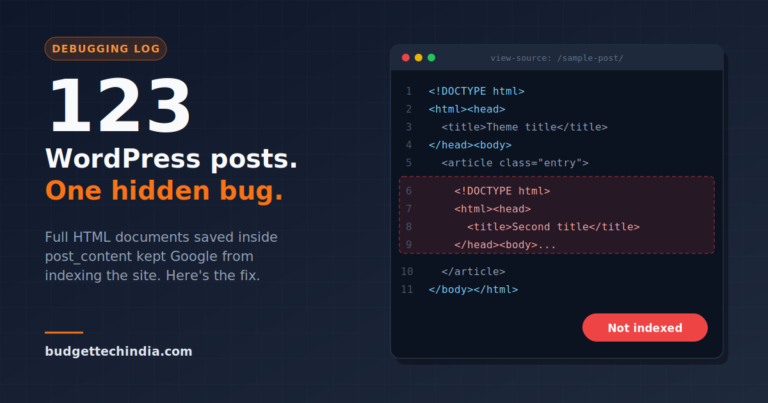
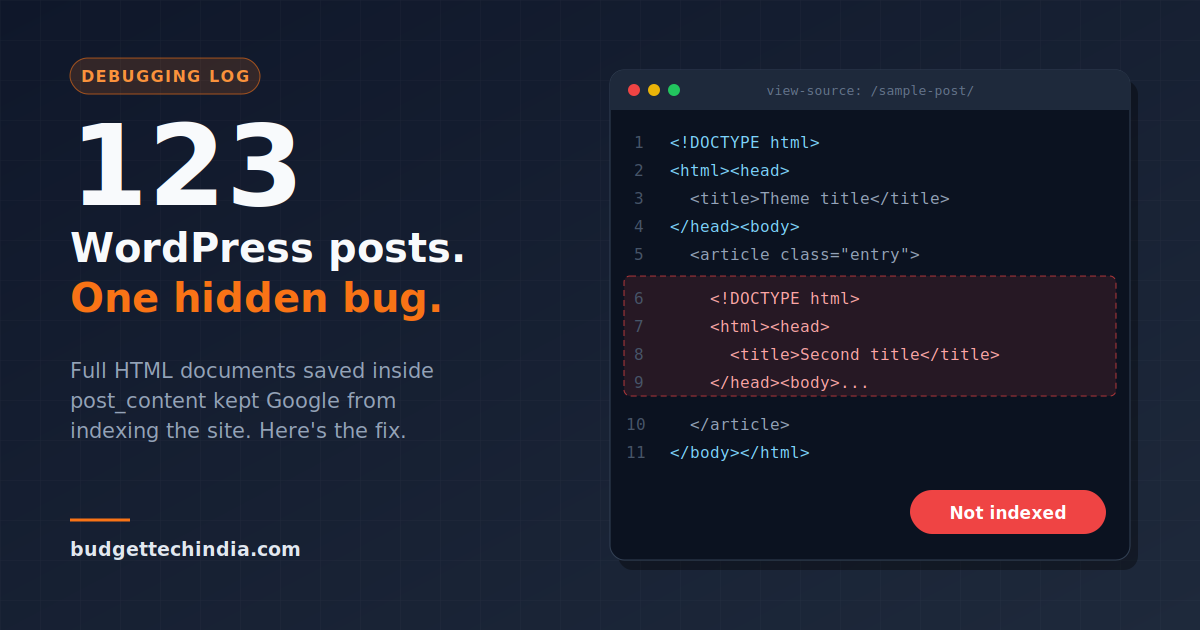
What I didn’t check was what the script was actually sending in the content field. In some runs, the generator returned a complete HTML document instead of an article body: <!DOCTYPE html>, <html>, a <head> with its own <title> and meta tags, then <body>, then the article. My script passed that straight through.
WordPress doesn’t complain. It saves whatever you give it into post_content, and the theme wraps it in a second page structure. Browsers are forgiving, so the page looked normal. Google saw a page with two titles, conflicting meta tags and a document nested inside a document.
How I spotted it
View Source on one of the unindexed posts gave it away. Halfway down the page, below the theme’s header, there was a second <!DOCTYPE html>.
One bad post means there are probably more, so I went to phpMyAdmin.
Finding every affected post with SQL
This query lists posts whose content contains document-level tags that should never be in an article body:
SELECT ID, post_title, post_status, post_date
FROM wp_posts
WHERE post_type = 'post'
  AND (
    post_content LIKE '%<!DOCTYPE%'
    OR post_content LIKE '%<html%'
    OR post_content LIKE '%<head>%'
  );
Change wp_ if your table prefix is different. On my site it returned 123 rows, roughly 80% of everything published.
Fixing them without editing 123 posts by hand
Back up first. Export wp_posts from phpMyAdmin or run mysqldump before touching anything. A bad regex on post content is not something you want to undo from memory.
If you’re on MySQL 8 or MariaDB 10.0.5+, REGEXP_REPLACE can strip everything outside the <body> tags in one pass:
UPDATE wp_posts
SET post_content = REGEXP_REPLACE(
  post_content,
  '(?s)^.*?<body[^>]*>|</body>.*$',
  ''
)
WHERE post_type = 'post'
  AND post_content LIKE '%<body%';
Then run the first query again. It should return zero rows. Open a few of the fixed posts in the editor to confirm the article text survived intact.
If your host runs an older MySQL without REGEXP_REPLACE, export the affected IDs and clean them with a small script through the REST API instead.
Clear the cache, or Google keeps seeing the old version
I use LiteSpeed Cache, and the cached pages still held the broken markup. After the SQL update I purged the entire cache, not just the affected URLs.
Then I resubmitted the post sitemap in Search Console and requested indexing for a handful of the most important URLs.
Stopping it from happening again
The database fix is pointless if the pipeline keeps producing bad content. I added a check in the Node script before anything gets sent to WordPress:
function cleanContent(html) {
  const bodyMatch = html.match(/<body[^>]*>([\s\S]*?)<\/body>/i);
  let content = bodyMatch ? bodyMatch[1] : html;

  if (/<!DOCTYPE|<html|<head>/i.test(content)) {
    throw new Error('Content still contains document-level tags, skipping post');
  }
  return content.trim();
}
If the body can be extracted, it’s used. If document tags still remain, the post is skipped instead of published. A missed post costs a day. A broken post costs indexing across the whole site.
What I’d tell anyone publishing to WordPress through an API
- WordPress will store anything you send it. Validate content in your own code.
- A page looking fine in the browser tells you nothing about what Googlebot sees. Check View Source.
- When Search Console shows a sitewide indexing problem, query the database before tweaking plugins.
- Always purge the cache after bulk database changes.
FAQ
Why are my WordPress posts crawled but not indexed?
It can be thin or duplicate content, weak internal linking, or technical problems in the page markup. If it affects most of the site at once, look for a technical cause such as broken HTML, conflicting meta tags or cached old versions.
Can HTML inside post content stop Google indexing a page?
Normal formatting tags are fine. A full HTML document saved inside a post, with its own head, title and meta tags, creates conflicting signals and malformed markup, which can hold a page back.
Is it safe to run UPDATE queries on wp_posts?
Only after a full backup, and only after running the matching SELECT first so you know exactly which rows will change.
About the Author